
Post jobs & internships
Create great job and internship posts that attract the right candidates.
Welcome to Broxer! This guide will help you create effective job and internship posts that attract the right candidates. Follow these detailed steps to ensure your postings stand out.
Create a post
Creating a job or internship post on Broxer is a straightforward process that allows you to provide all necessary details to attract potential candidates.
- Navigate to the job posting section: Log into your employer account, and go to the "Post a Job/Internship" option on your dashboard.
- Use the rich editor: Fill in the details about the position, including job title, description, and requirements. The rich editor allows for formatting such as bullet points, headings, and links.
- Set a deadline: Specify the application deadline using the format "DD/MM/YYYY". Ensure it aligns with your hiring timeline.
- Autosave feature: Be aware that your drafts will be automatically saved as you fill in the details, so you can come back to complete or edit them at any time.
Tip: Make use of job descriptions that are concise yet comprehensive, highlighting the most attractive aspects of the job or internship.
Gotcha: Avoid using overly technical language or jargon not commonly known to your target audience, which might deter candidates.
Screening questions
Adding screening questions and knockout answers is vital in filtering candidates effectively and ensuring that only the most suitable applicants proceed in the hiring process.
- Access the screening section: During the job posting process, locate the screening questions option.
- Add your questions: Insert relevant screening questions that assess candidates’ qualifications and fit for the role.
- Define knockout answers: For each question, specify knockout answers that, if selected by a candidate, will automatically disqualify them from the application pool.
Tip: Create questions that are directly related to the job's essential skills and responsibilities to gather useful insights.
Gotcha: Ensure that your knockout questions are fair and relevant, as too many can significantly reduce your candidate pool.
Job credits & cost
Understanding the cost of job postings in credits is crucial for managing your budget while utilizing Broxer's services for your hiring needs.
- Credits breakdown: Each job posting requires a certain number of credits, which can be purchased through your employer dashboard.
- Internships via job credit: You can use the same credits for posting internships as job listings, providing flexibility in your hiring strategies.
- NGO exemption: Non-governmental organizations (NGOs) are eligible for certain exemptions that allow them to post jobs free of charge under specific conditions.
Tip: Always check the current credit requirements for postings, as they may vary based on the type of position.
Gotcha: Keep an eye on the expiration of your credits; they may have a validity period that can affect your ability to post when needed.
Edit, close & feature
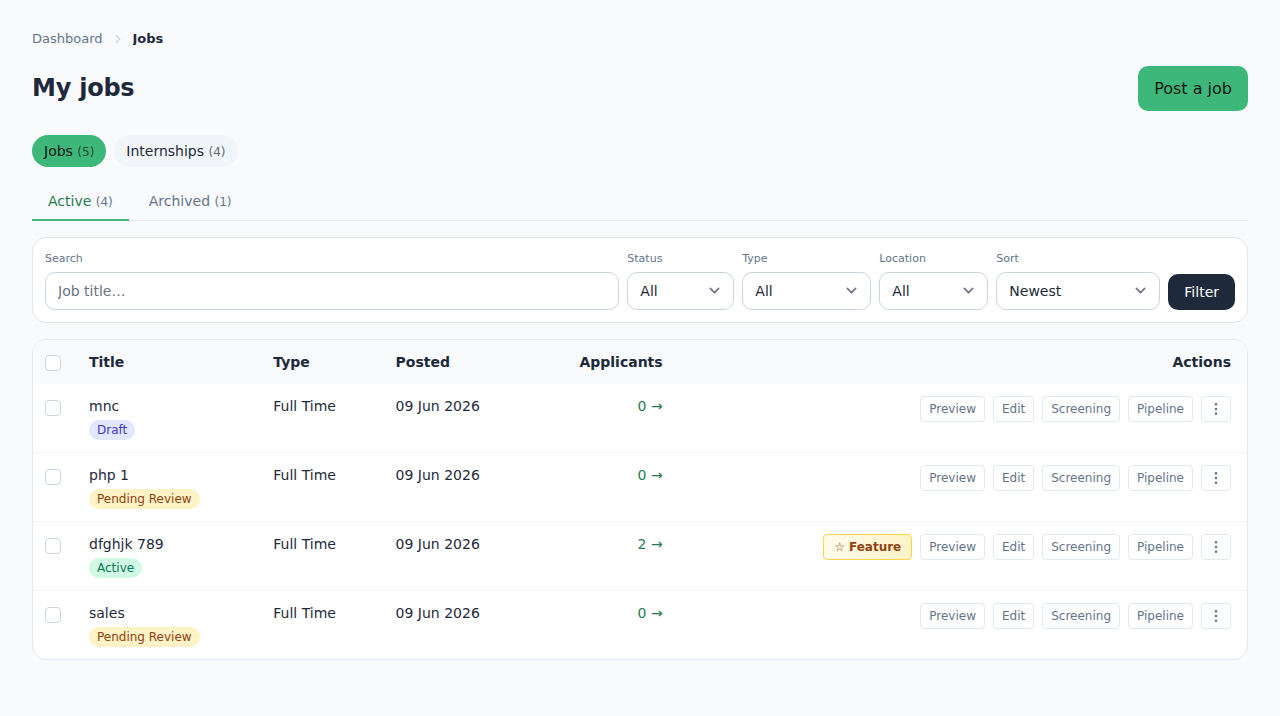
Managing your job postings effectively is essential to optimize visibility and ensure timely hiring processes.
- Edit your post: Navigate to your posted jobs list, select the position, and click on the edit option to make necessary changes.
- Close or archive: If a position has been filled or is no longer available, you can close or archive the posting. This action is terminal; once closed, the post cannot be reactivated.
- Feature a job: For greater visibility, consider featuring your job. This option requires additional credits but can significantly enhance the reach.
- Pending-review moderation: Be aware that newly posted jobs may require moderation before going live, so allow some time for approval.
Tip: Regularly review and update job postings to reflect any changes in job requirements or company information.
Gotcha: Remember that once a job is closed or archived, you will need to create a new post for any future openings, so decide carefully before taking that action.