
When a recruiter invites you to apply
Recruiters can invite you to apply to a job — here is how invites work.
Welcome to Broxer! When a recruiter invites you to apply for a job, it’s a sign that they are interested in your profile and believe you could be a great fit for their organization. This guide will walk you through how to handle these invites effectively.
Your invites
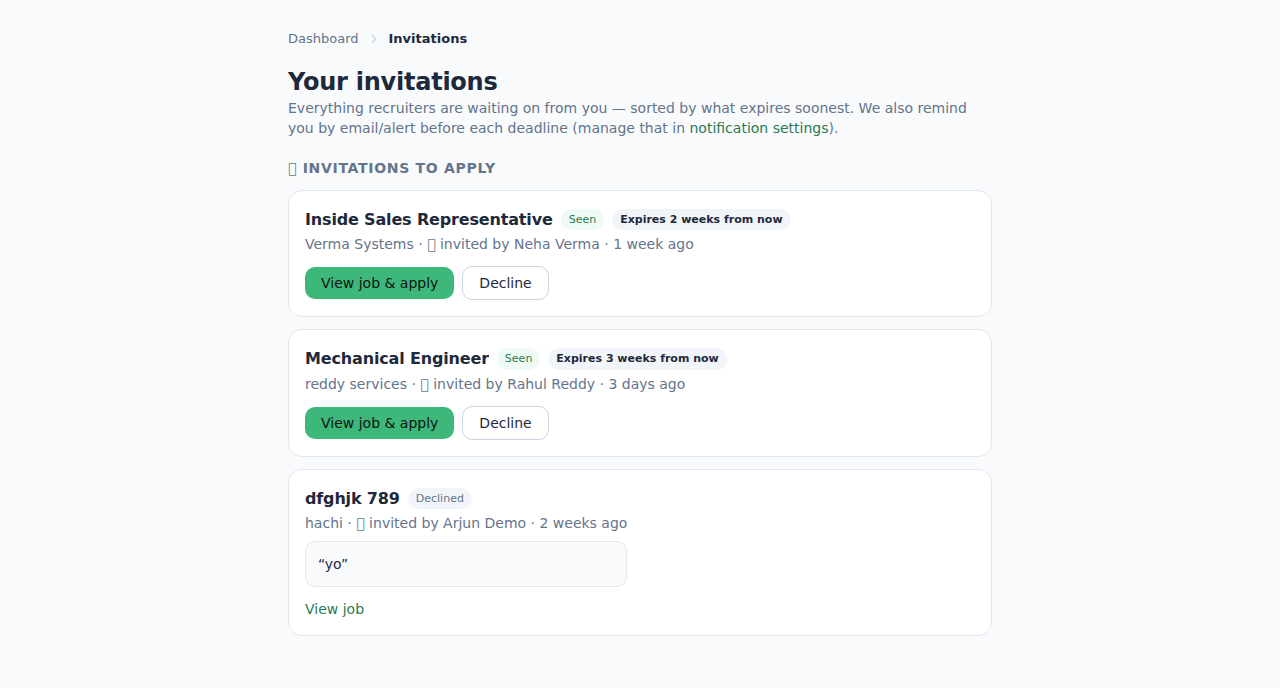
An invite to apply is a message from a recruiter expressing their interest in you for a specific job opening. This is a great opportunity to showcase your expertise and potentially secure a job that aligns with your career goals.
Here’s how to respond to an invite:
- Check Your Notifications: Log into your Broxer account and check the notifications section to find the invite from the recruiter.
- Read the Job Details: Click on the job title in the invitation to review the full job description, requirements, and company details.
- Decide to Apply: If the job aligns with your skills and interests, you can proceed to apply. If not, you can choose to decline the invitation politely.
- Start Your Application: Click the "Apply Now" button directly from the invite. This feature allows you to autofill your application with the information from your Broxer profile.
- Customize Your Application: Even though some details will be auto-completed, take the time to customize your cover letter and resume to match the position.
- Submit Your Application: After reviewing all the information, click "Submit" to complete the application process.
Tip: Always keep your Broxer profile updated with your latest skills and experiences. This will make it easier for recruiters to find and invite you to suitable opportunities.
Common Gotcha: Remember that if you receive an invite but don’t respond within a certain timeframe, it may expire. Make sure to check your notifications regularly to ensure you don't miss any opportunities.