
Interviews & mock interviews
Handle scheduled interviews, practise with mock interviews, and submit video-interview invites.
Welcome to the Broxer help guide for interviews and mock interviews. This guide is designed to help candidates successfully manage scheduled interviews, practice their interview skills with mock interviews, and submit video interview invites efficiently.
Scheduled interviews

Scheduled interviews are a crucial aspect of the hiring process. They allow you to engage directly with potential employers and showcase your skills. It’s essential to manage these effectively.
- Viewing your scheduled interviews: Log in to your Broxer account. Navigate to the 'Interviews' section from your dashboard. Here, you will see a list of your upcoming interviews along with the details including date, time, and the employer’s information.
- Accepting an interview: If you receive an invitation for an interview, go to your notifications. Click on the invitation and select 'Accept' to confirm your attendance.
- Rescheduling an interview: If you need to change the timing, click on the 'Reschedule' option next to the interview details. Propose a new date and time that works for you. Make sure to check the timezone settings to avoid conflicts.
- Your timezone: Check and set your correct timezone in your account settings to ensure that you receive interview invitations in your local time.
- Adding to your calendar: Once you accept an interview, you can add it to your personal calendar. Look for the 'Add to Calendar' option next to the interview details and follow the prompts.
- Setting reminders: It's a good practice to set reminders for your interviews. Use the 'Set Reminder' feature available in the interviews section to receive notifications ahead of your scheduled time.
Tip: Make it a habit to check your interview section daily to stay updated on any new invitations or changes.
Common Gotcha: Remember to double-check your timezone settings; improper settings may lead to missed interviews due to time misalignment.
Mock interviews
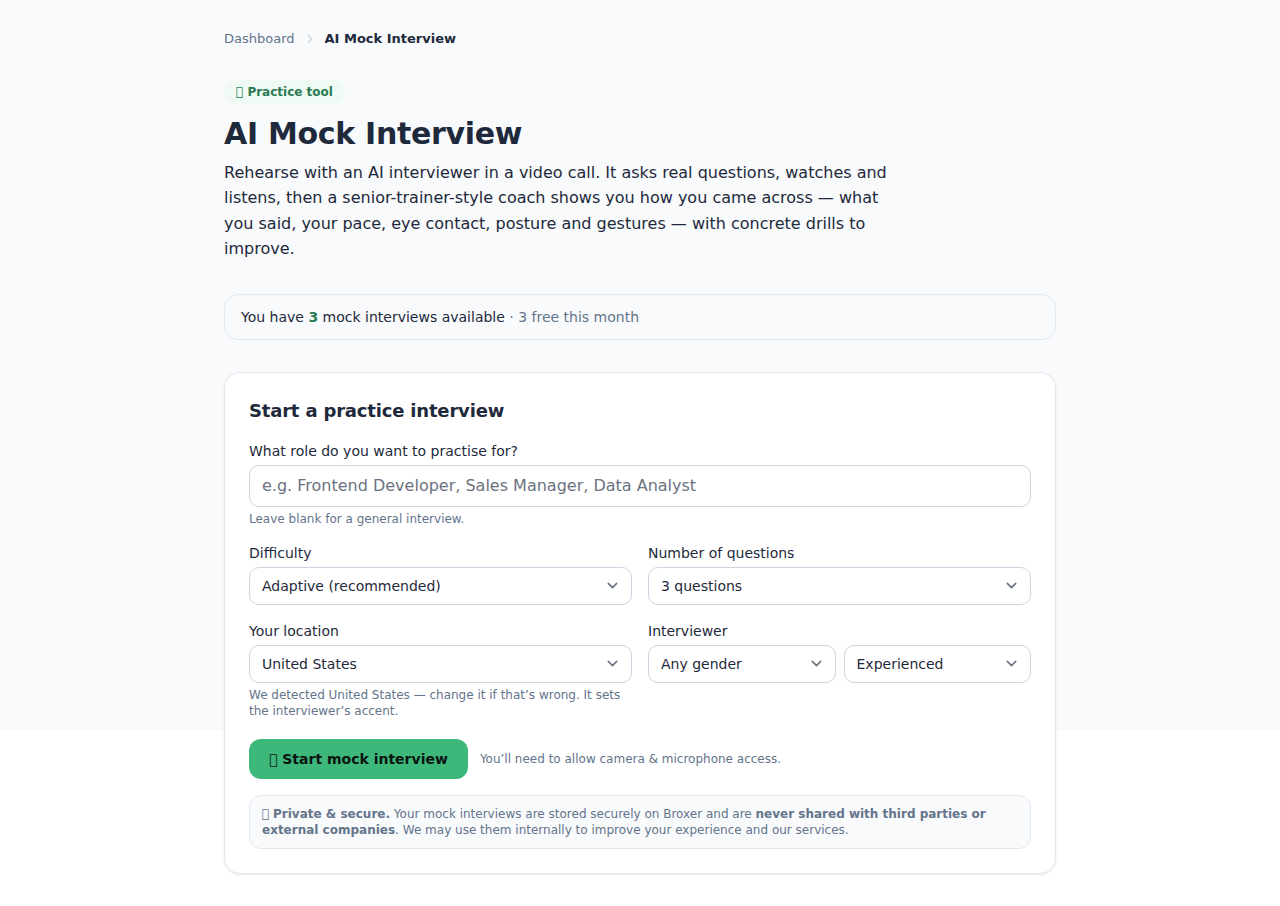
Mock interviews are a valuable tool for practicing your responses and getting accustomed to interview environments. You can practice using AI simulations, which provide instant feedback and suggestions.
- Practising with AI mock interviews: Access the 'Mock Interviews' section from your dashboard. Choose a specific role or skill you want to practice. Follow the prompts to engage in a simulated interview.
- Answering questions: During the mock interview, answer the questions as you would in a real interview setting. Try to be specific and articulate in your responses.
- Reviewing your performance: Once the mock interview is completed, you will receive a report summarizing your performance. Review the areas highlighted for improvement and the feedback provided.
Tip: Use the mock interview feature regularly to build confidence and refine your interview skills.
Common Gotcha: AI mock interviews may sometimes ask unexpected questions, which can be tricky. Remain calm and treat these as opportunities to think creatively.
Video-interview invites
Recording and submitting async video interviews allows you to complete your interview at your convenience. Here’s how to manage video interview invites sent by recruiters.
- Receiving a video-interview invite: When you receive an invite, it will appear in your notifications. Click on the invite to view the details, including the deadline for submission.
- Preparing for your recording: Ensure you have a quiet space with good lighting. Check your camera and microphone to make sure they are working correctly prior to recording.
- Recording your video: Use the 'Record Video Interview' option within the invite. Follow the instructions provided, and try to convey your enthusiasm and suitability for the role.
- Submitting your video: After you are satisfied with your recording, follow the prompts to submit it. Ensure you complete the submission before the deadline to avoid missing the opportunity.
Tip: Practice your responses before recording to improve your delivery and reduce anxiety.
Common Gotcha: Ensure that your video file meets the required format and length specified in the invite to avoid submission errors.